
Call or text us.
Same number, same team.
Cseris Technologies publishes this number so customers and partners can reach support. Texting it opts you in to conversational customer-care replies from us — not marketing.
6am – 11pm CT daily. Overnight, leave a voicemail or send a text and we’ll follow up at 6am.
Text this number to reach Cseris Technologies support. We’ll reply from the same number.
What you get when you text
When you send a text to +1 (557) 200-0364, our system replies:
Cseris Technologies: thanks for your message. We’ll be with you shortly. Msg frequency may vary. Msg & data rates may apply. Reply STOP to opt out, HELP for help. We will not share or sell your mobile information for marketing or promotional purposes.
After that, messages are one-to-one customer-care replies about the issue you raised — scheduling, status, and follow-up. We do not send promotions on this number.
How you opt in
- Inbound text. This number is published here and on our Inquire page. You text it first. That inbound message is your opt-in. We reply with the confirmation above.
-
Call path. You call +1 (557) 200-0364 (this page, the Inquire page, in-product support, or a team member). A support representative states:
By providing your phone number, you agree to receive SMS customer-care messages from Cseris Technologies about your support request. Message frequency may vary. Standard message and data rates may apply. Reply STOP to opt out. Reply HELP for help. We will not share mobile information with third parties for promotional or marketing purposes.
Once you agree, we record the number and send:Cseris Technologies: you agreed to receive SMS customer-care updates. Msg frequency may vary. Msg & data rates may apply. Reply STOP to opt out, HELP for help.
- Web form. On the Inquire page you may optionally check the SMS box when you submit a phone number. The form repeats the same disclosure.
Keywords
These work on both +1 (557) 200-0364 and the Client Connect number, +1 (314) 343-1347.
- STOP, STOPALL, UNSUBSCRIBE, CANCEL, END, QUIT — we stop texting you and confirm the opt-out
- START, UNSTOP — you opt back in
- HELP, INFO — we send help contact details
Client Connect text alerts
Aeris is a dealership platform built by Cseris Technologies. Its Client Connect feature lets dealership staff send customers delivery and walkaround videos. Aeris users can choose to get text alerts about their own videos, for example when a client watches a video, a link goes unopened for 3 days, or a video finishes processing, plus an optional weekly summary. These are account alerts only. We never send marketing on this number.
Texts go only to the Aeris user who turned them on, never to the dealership’s customers. Message frequency varies with how many videos you send and which alerts you turn on. Message and data rates may apply.
Alert texts start with “Aeris Client Connect:”. Reply STOP to opt out, HELP for help.
How you opt in to Client Connect
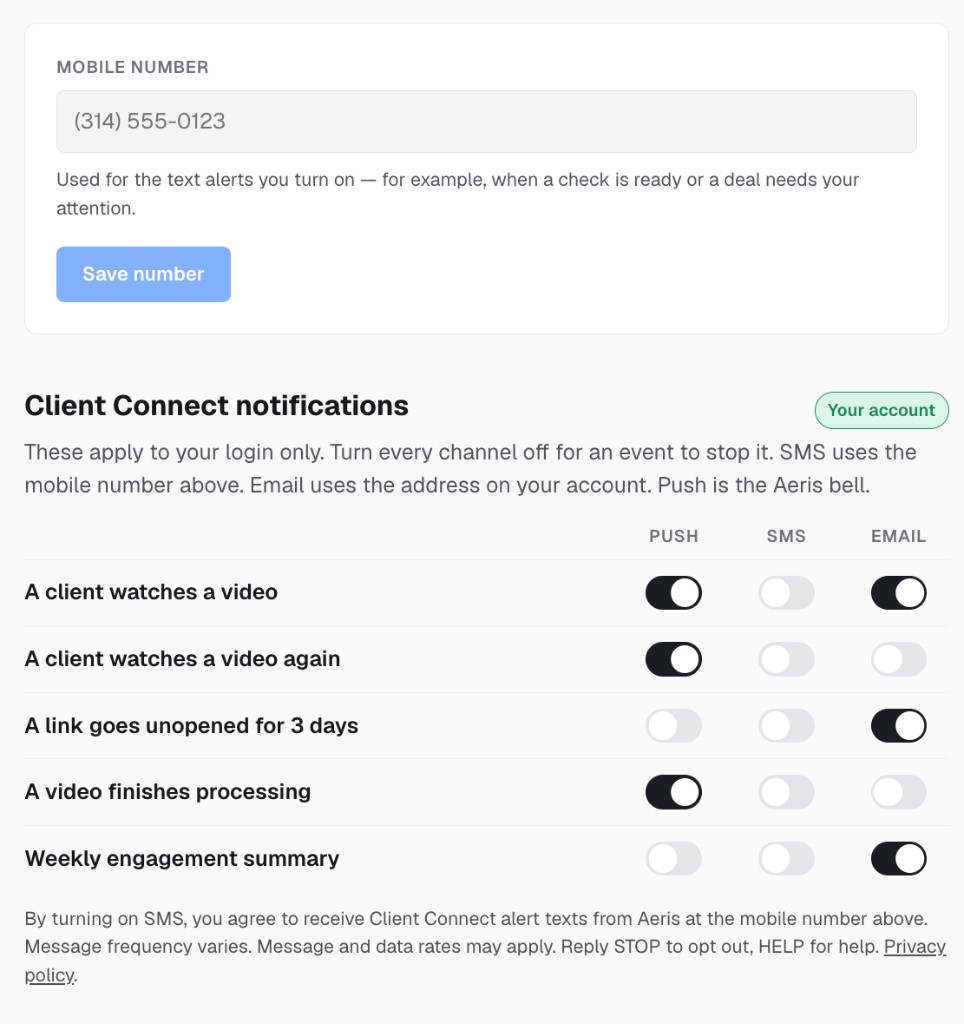
- Sign in to Aeris and open Settings → Notifications.
- Add your mobile number and select Save number.
-
Under Client Connect notifications, turn on SMS for an alert. SMS is off for every alert until you turn it on. This text appears right under the switches:
By turning on SMS, you agree to receive Client Connect alert texts from Aeris at the mobile number above. Message frequency varies. Message and data rates may apply. Reply STOP to opt out, HELP for help. Privacy policy
The “Privacy policy” link opens this site’s privacy policy. -
The first time you turn on SMS, we record your consent and send one confirmation text:
Aeris Client Connect: You’re signed up for text alerts. Msg frequency varies. Msg & data rates may apply. Reply STOP to opt out, HELP for help.
This is the opt-in screen in Aeris. SMS is off for every alert until you add a number and turn it on:
Client Connect sample alerts
Aeris Client Connect: Dana watched your delivery video
Watched 85% - TC 1001
Reply STOP to opt out.
Aeris Client Connect: Dana's delivery link for TC 1001 hasn't been opened in 3 days.
Reply STOP to opt out.
Aeris Client Connect: The delivery video for TC 1001 is ready.
Reply STOP to opt out.
Aeris Client Connect: Last 7 days: 4 videos sent, 9 opens.
Reply STOP to opt out.
How you opt out of Client Connect
Reply STOP to any Client Connect text. That stops all Client Connect texts to your number and turns off SMS in your Aeris settings. You can also turn SMS off in Settings → Notifications at any time. To start again, text START to +1 (314) 343-1347, then turn SMS back on in Aeris.
When you reply STOP, we send one last text:
Aeris Client Connect: You are unsubscribed and will receive no further messages. Reply START to resubscribe.
Client Connect help
Reply HELP to any Client Connect text, and we send:
Aeris Client Connect: account alerts from Cseris Technologies. Msg frequency varies. Msg & data rates may apply. Reply STOP to opt out. Contact: josh@cseristechnologies.com
Privacy
Mobile information, including phone numbers and SMS opt-in data and consent, will not be sold or shared with third parties or affiliates for promotional or marketing purposes. Consent is not a condition of purchase. Carriers are not liable for delayed or undelivered messages. See our privacy policy.
Questions: josh@cseristechnologies.com, text HELP to +1 (557) 200-0364, or text HELP to +1 (314) 343-1347 about Client Connect alerts.